
Free Pre-Start Checklist (Router Table) Template
Download a free Pre-Start Checklist (Router Table) Template to formalise equipment inspections. This DOCX and PDF helps identify hazards before use.
Free Pre-Start Checklist (Router Table) Template
DOCX • 125 KB + PDF
Updated Oct 2026
No signup required
Purpose of the Free Pre-start Checklist (Router Table) Template
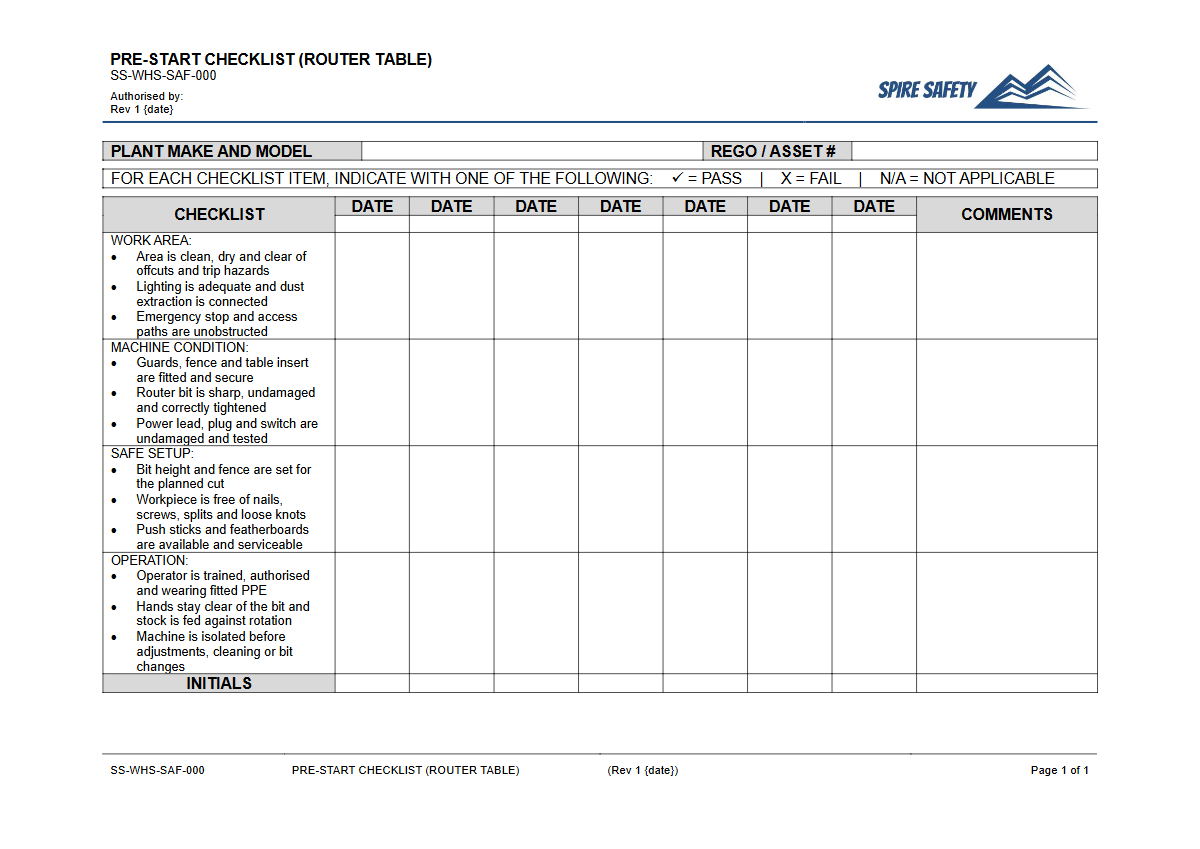
Using a router table introduces significant workplace risks, including entanglement, cuts, and eye injuries from flying debris. This free Pre-Start Checklist (Router Table) Template provides a structured framework to guide operators through essential safety and maintenance checks before they begin work.
Systematically inspecting the equipment helps identify faults, damage, or missing guards that could lead to an incident. By documenting these checks, a business can demonstrate its commitment to proactive risk management and due diligence.
Formalising this process ensures that safety checks are not forgotten during busy periods and become a routine part of daily operations. Integrating such procedures is a fundamental component of effective WHS management systems, helping to create a safer environment for everyone in the workshop.
Video walkthrough
How to use the Free Pre-start Checklist (Router Table) Template
This resource is available for immediate download in both DOCX and PDF formats. The DOCX version is fully editable, allowing you to tailor it to your specific operational needs. To use the template effectively, follow these steps:
- Download the file and open the DOCX version.
- Review the existing checklist items and compare them against your router table's manufacturer specifications and your site's risk assessment.
- Add, remove, or modify checks to reflect the unique features and hazards of your equipment and work processes. For instance, you might add checks specific to a particular fence system or lifting mechanism.
- Incorporate your company branding, including your logo and business name.
- Once finalised, save the document and distribute it to all relevant personnel. Ensure operators are trained on how to complete it correctly.
Important: This document is a template, not a finished safety document. To ensure it is effective for your specific circumstances, we strongly recommend you customise this checklist. You must adapt it to the make and model of your router table, the specific tasks performed, and the unique risks present in your workplace.
If you need assistance with this process, consider engaging professional WHS consulting services.
When to use a Router Table Checklist
A pre-start check should be completed by the operator before the first use of the router table on any given day or at the beginning of each shift. This frequency ensures that any damage or issues that may have occurred overnight or between shifts are identified before the machine is energised.
It transforms the inspection from a once-off task into a consistent, non-negotiable safety habit. This routine is crucial for maintaining both the equipment and a strong safety culture.
You can reinforce the importance of this daily habit by holding regular safety meetings. A Pre-Start Checks and Plant Maintenance toolbox talk can be an effective way to communicate expectations and discuss any recurring issues found during inspections.
Who should use this Checklist
The primary user of this checklist is the trained and authorised operator of the router table. This person has the hands-on knowledge to accurately assess the machine's condition.
They are responsible for physically inspecting each item and signing off that the equipment is safe to use. If any defects are found, the operator is responsible for reporting them immediately and ensuring the machine is tagged out of service.
Supervisors and managers also have a role. They should periodically review completed checklists to supports your compliance efforts and identify trends in equipment faults or operator behaviour.
This oversight helps verify that the safety system is working as intended. Furthermore, ensuring operators are competent is just as critical as checking the machine; for related equipment, you might use a Table Saw VOC template to formally verify an operator's skills.
What to Check on a Router Table
A thorough inspection covers the machine, its tooling, and the surrounding environment. While your customised checklist will be specific, key areas to inspect generally include:
- Work Area: The floor is clear of obstructions, slip hazards, and off-cuts. Lighting is adequate for the task.
- Guards and Fences: All guards (including bit guards) and the fence are in place, secure, and correctly adjusted for the job. Push sticks and blocks are available and in good condition. le>Electrical Components: The power cord and plug are free from damage. The On/Off switch and emergency stop button (if fitted) are functional and accessible.
- Dust Extraction: The dust extraction system is connected and functioning correctly to minimise exposure to harmful wood dust.
- Tooling: The router bit is sharp, clean, and free from damage or built-up resin. It is securely fastened in a clean collet.
These checks follow similar safety principles to those outlined in procedures for other high-risk woodworking equipment, such as a FREE Table Saw SOP (Safe Operating Procedure) Template, focusing on isolating machinery and controlling hazards before work starts.
Common mistakes
Common mistakes to avoid
- Skipping the pre-start check for a 'quick job', which is often when incidents occur.
- Using dull, chipped, or incorrect types of router bits, increasing the risk of kickback and poor-quality work.
- Failing to properly adjust or use safety guards and fences for the specific task.
- Not using push sticks or blocks for small workpieces, bringing hands too close to the cutter.
Legal references
Legal considerations
The following legal requirements may be relevant to this type of work.
- Work Health and Safety Act (Harmonised) — Provides the primary duties for protecting workers and other people from work health and safety risks.
- Work Health and Safety Regulations (Harmonised) — Sets out requirements supporting the management of workplace hazards and risks.
The following codes may be relevant to this type of work.
- Managing WHS Risks Code of Practice — Provides practical guidance on identifying hazards, assessing risks and applying effective controls.
- Work Health and Safety Consultation, Cooperation and Coordination Code of Practice — Provides practical guidance on consulting workers and coordinating with other duty holders.
- Managing the Work Environment and Facilities Code of Practice — Provides practical guidance on safe work environments, workplace facilities and related controls.
Did you know
High-Speed Operation
Router bits can spin at speeds exceeding 20,000 RPM (Revolutions Per Minute). This extreme speed allows for clean cuts but also presents a significant hazard if contact is made or if a bit is damaged.
Wood Dust Hazards
Effective dust extraction is not just for cleanliness. Wood dust is a hazardous substance that can cause respiratory diseases and is also a fire and explosion risk in high concentrations.
FAQ
Frequently asked questions
01How often should a router table pre-start check be performed?
02What is the most common hazard associated with router tables?
03Is this pre-start checklist template suitable for all router table models?
04Who is responsible for completing the router table checklist?
Share this resource
Free Pre-Start Checklist (Router Table) Template
Browse Categories
How To Use It
- 1Download and open in Word or PDF.
- 2Replace the placeholders with your business details.
- 3Get it reviewed by a WHS specialist before rollout.
Need it customised?
Our WHS consultants can adapt this template to your site, run a gap analysis, or audit what you already have in place.
Book a Free Consultation WHS consulting servicesor call 1300 156 382