
Free Pre-Start Checklist (Paper Cutter) Template
Download our free Pre-Start Checklist (Paper Cutter) Template. This structured DOCX and PDF helps formalise safety inspections before use. Customise it today.
Free Pre-Start Checklist (Paper Cutter) Template
DOCX • 125 KB + PDF
Updated Oct 2026
No signup required
Purpose of the Free Pre-Start Checklist (Paper Cutter) Template
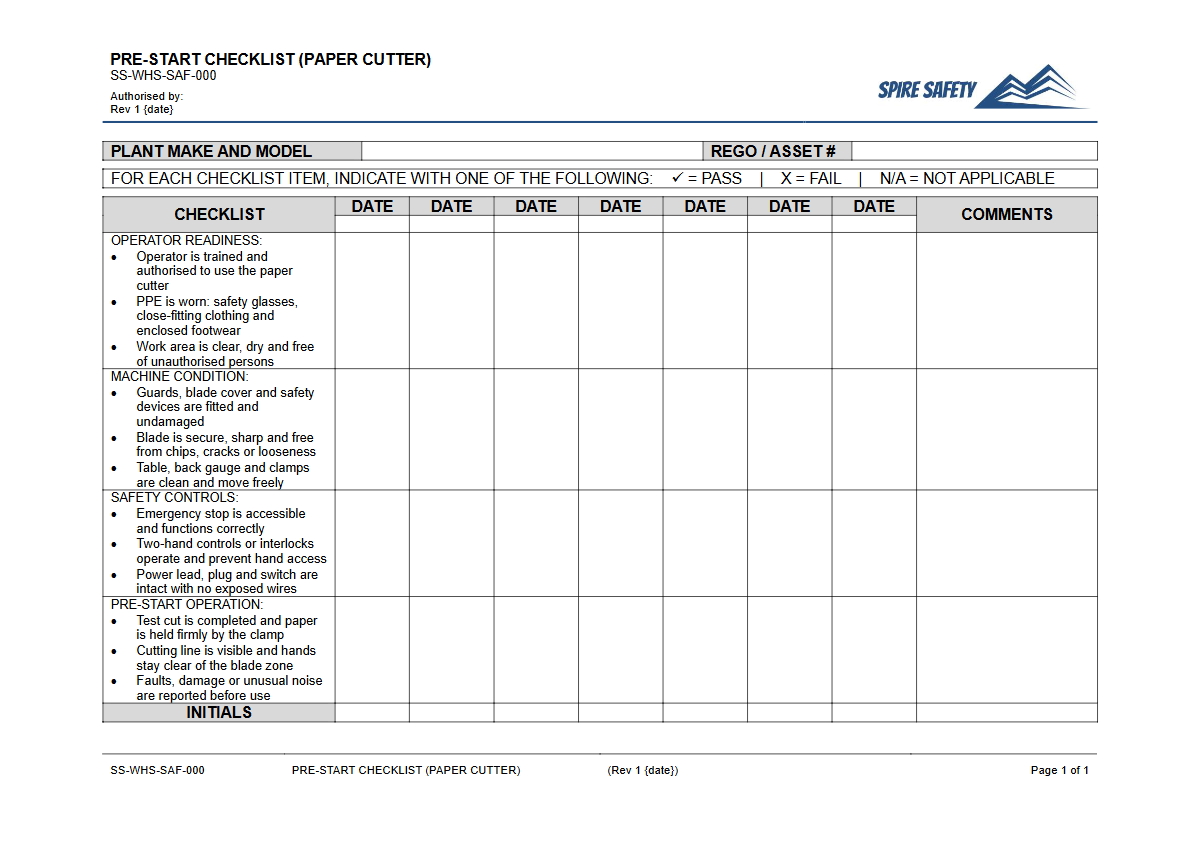
A paper cutter, whether a large guillotine or a smaller rotary trimmer, presents significant hazards, primarily from its sharp blade. This free Pre-Start Checklist (Paper Cutter) Template provides a structured way for operators to inspect the equipment for damage or faults before they start work.
Systematically checking key components like blade condition, safety guards, clamps, and emergency stops helps identify and control risks before an incident occurs. Formalising this process ensures that safety checks are not forgotten and creates a consistent record of equipment condition, which is a key part of demonstrating WHS due diligence.
Using a checklist helps embed a proactive safety culture where equipment maintenance and operator safety are prioritised. It serves as a daily reminder of the inherent risks associated with the machine and the critical safety features designed to mitigate them.
For a more detailed procedural document on safe equipment use, you can draw inspiration from resources like a Laser Cutter SOP, adapting the principles of hazard identification and control to your specific cutting equipment.
Video walkthrough
How to use the Free Pre-Start Checklist (Paper Cutter) Template
This template is a starting point for developing a site-specific safety document. First, download the DOCX or PDF and add your company branding.
Next, review each checkpoint against the specific make and model of paper cutter used in your workplace. You may need to add, remove, or modify items to ensure they are relevant.
For example, an electric guillotine will have different checkpoints (e.g., emergency stop button, two-handed controls) compared to a manual rotary trimmer.
Once customised, train all operators on how to use the checklist correctly. This includes not just ticking boxes, but understanding what they are looking for and the procedure to follow if they find a defect (e.g., tagging the equipment out of service and reporting it to a supervisor).
This checklist should be integrated into your broader comprehensive WHS management systems to ensure inspections are completed, reviewed, and acted upon consistently.
Important: This is a template, not a finished document. We cannot guarantee it covers every specific hazard in your workplace.
You must customise it to reflect your specific paper cutter model, work environment, and operational procedures.
When to use it
A pre-start checklist for a paper cutter should be completed before its first use each day or at the beginning of every shift where it is expected to be used. The frequency should be determined by your own risk assessment; equipment that is used more frequently or is located in a harsh environment may require more frequent checks.
These routine inspections are vital for identifying gradual wear and tear before it leads to a failure. This same principle of regular checks applies to other common workplace equipment, as seen in our Pre-Start Checklist (3D Printer) Template.
Completing the check before operation ensures that any identified issues can be addressed before the machine is put under load, preventing potential injuries and costly unplanned downtime. Records of these completed checks should be retained in accordance with your organisation's document control procedures.
Who should use it
The primary users of this checklist are the trained and authorised operators of the paper cutter. They are the people most familiar with the equipment's day-to-day performance and are best placed to spot subtle changes or defects.
Supervisors and managers also have a role; they are responsible for ensuring the checks are being completed correctly and for taking appropriate action when faults are reported. They may conduct periodic spot-checks to verify the accuracy of the completed forms.
WHS managers or coordinators will find this template useful for standardising safety procedures across a worksite or organisation. They can adapt it for various pieces of plant and equipment to build a robust inspection program.
For businesses seeking to develop or refine their overall safety framework, engaging with expert WHS consulting services can provide valuable guidance and support. You can also explore our complete free WHS resources library for more templates and tools to assist your safety efforts.
Common mistakes
Common mistakes to avoid
- Failing to customise the template to match the specific model and features of the paper cutter in use.
- Operators 'pencil-whipping' the form without physically inspecting the equipment.
- Not immediately removing a faulty paper cutter from service after a defect is identified.
- Neglecting to train workers on the procedure for reporting faults and tagging out unsafe equipment.
Legal references
Legal considerations
The following legal requirements may be relevant to this type of work.
- Work Health and Safety Act (Harmonised) — Provides the primary duties for protecting workers and other people from work health and safety risks.
- Work Health and Safety Regulations (Harmonised) — Sets out requirements supporting the management of workplace hazards and risks.
The following codes may be relevant to this type of work.
- Managing WHS Risks Code of Practice — Provides practical guidance on identifying hazards, assessing risks and applying effective controls.
- Work Health and Safety Consultation, Cooperation and Coordination Code of Practice — Provides practical guidance on consulting workers and coordinating with other duty holders.
- Managing the Work Environment and Facilities Code of Practice — Provides practical guidance on safe work environments, workplace facilities and related controls.
Did you know
Unchanged Design
The modern paper guillotine was patented in the 1840s and 1850s. The core principles of its design—a sharp, descending blade and a clamping mechanism—have remained largely unchanged for over 170 years.
Guard Integrity
According to safety incident data, a significant portion of injuries involving paper cutters occur because the safety guard was either faulty, disabled, or missing entirely. This highlights why guard inspection is a critical part of any pre-start check.
FAQ
Frequently asked questions
01What are the main hazards of a paper cutter?
02How often should a paper cutter pre-start check be done?
03Is a pre-start checklist a legal requirement in Australia?
04Can this template be used for all types of paper cutters?
Share this resource
Free Pre-Start Checklist (Paper Cutter) Template
Browse Categories
How To Use It
- 1Download and open in Word or PDF.
- 2Replace the placeholders with your business details.
- 3Get it reviewed by a WHS specialist before rollout.
Need it customised?
Our WHS consultants can adapt this template to your site, run a gap analysis, or audit what you already have in place.
Book a Free Consultation WHS consulting servicesor call 1300 156 382