
Free Pre-Start Checklist (Photocopier) Template
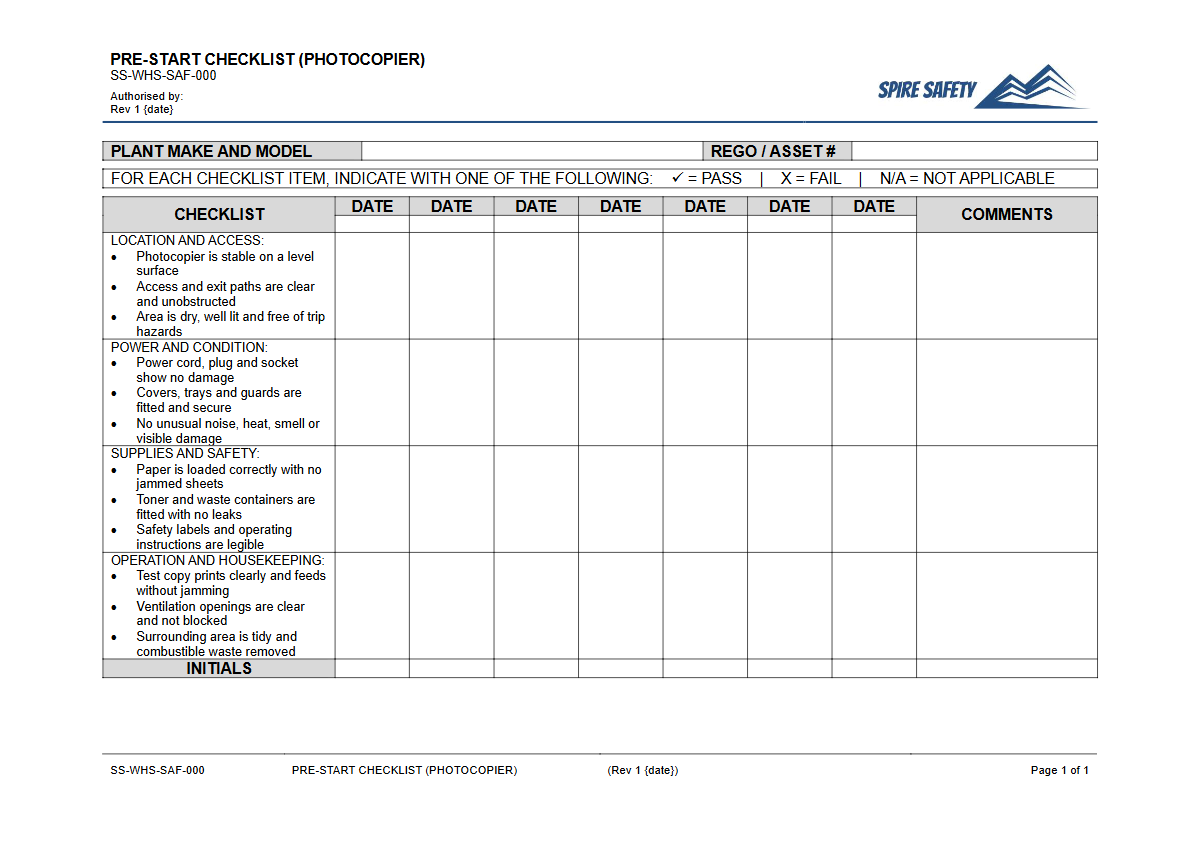
Download our free Pre-Start Checklist (Photocopier) Template. This structured DOCX & PDF resource helps formalise safety checks for office equipment.
Free Pre-Start Checklist (Photocopier) Template
DOCX • 125 KB + PDF
Updated Oct 2026
No signup required
Purpose of the Free Pre-Start Checklist (Photocopier) Template
A photocopier might seem like a standard, low-risk piece of office equipment, but it still presents several potential hazards. Regular inspections are a fundamental part of maintaining a safe working environment.
Using a structured Free Pre-Start Checklist (Photocopier) Template helps your organisation formalise these checks, ensuring that potential issues like electrical faults, mechanical failures, or ergonomic risks are identified and addressed before they can cause harm. This proactive approach is a cornerstone of effective workplace health and safety management.
This template prompts users to systematically inspect the machine for common hazards. By documenting these checks, you create a clear record of due diligence, demonstrating a commitment to worker safety. While a photocopier isn't as complex as other machinery, the principles of pre-start inspection remain the same, similar to those you might find in our Free Pre-Start Checklist for 3D Printers.
Key Elements of a Photocopier Pre-Start Checklist
A thorough check should cover several key areas to ensure the equipment is safe for operation:
- Electrical Safety: Inspecting power cords and connections for any signs of fraying, damage, or stress. Ensure the outlet is not overloaded.
- Physical Condition: Checking for cracks in the casing, ensuring all panels and covers are secure, and verifying that the machine is stable and not at risk of tipping.
- Operating Environment: Confirming there is adequate ventilation around the unit to prevent overheating, and ensuring the surrounding area is free from trip hazards like boxes or stray cables.
- Consumables: Looking for any signs of toner leakage inside or outside the machine. While checking paper levels, workers should be mindful of safe lifting techniques.
- Functionality: A quick test to ensure the machine powers on correctly and operates without unusual noises, error messages, or smells.
Video walkthrough
How to use the Free Pre-Start Checklist (Photocopier) Template
This document provides a solid foundation for developing your site-specific checklist. To implement it effectively, follow these steps:
- Download the template in the format that suits you best (DOCX for easy editing or PDF).
- Review the checklist items and add, remove, or modify them to match the specific make and model of photocopier used in your workplace. Consider its location, usage frequency, and any previously identified risks.
- Consult with the workers who regularly use the equipment. Their direct experience is invaluable for identifying practical safety checks and potential hazards.
- Once finalised, integrate the checklist into your daily or shift-based opening procedures.
- File completed checklists as part of your safety records. This documentation is crucial for audits and continuous improvement of your WHS management systems.
Important Customisation Note
This document is a template and is not a complete safety solution on its own. It is essential that you customise this pre-start checklist to address the specific hazards associated with your particular equipment, environment, and work tasks.
We are not liable for any incidents that occur from the use of this template; its effectiveness depends on its correct customisation and implementation.
When to use it
A pre-start checklist for a photocopier should be completed at consistent intervals to be effective. The ideal frequency depends on your workplace's specific circumstances, but common practice includes:
- At the start of each workday: This is the most common and recommended frequency for a typical office environment.
- At the beginning of each shift: In high-usage settings like a 24/7 call centre or a print shop where the machine is in constant use.
- After maintenance or repairs: To verify that the equipment has been returned to a safe operating condition.
- Following an office relocation or reconfiguration: To ensure the machine has been set up safely in its new location.
Regular safety discussions can help reinforce the importance of these checks. Our Pre-Start Checks and Plant Maintenance Toolbox Talk can be adapted to facilitate these conversations, even for office equipment.
Who should use it
The responsibility for completing the pre-start check should fall to the people directly interacting with the equipment. This empowers them to take ownership of safety in their immediate work area. Key personnel include:
- Office Staff and Administrators: Any worker who uses the photocopier as part of their daily tasks.
- Office Managers or Team Leaders: Supervisors responsible for overseeing the administrative functions and general safety of the office area. They should ensure the checks are being completed correctly and that any reported faults are actioned.
- WHS Representatives: They may use the completed checklists to monitor safety performance and identify trends.
A key, often overlooked, part of using office equipment is the manual handling of consumables. Training staff on correct lifting techniques for heavy paper boxes is vital, a topic covered broadly in resources like the Aged Care Manual Handling Toolbox Talk Template, which has principles applicable to any workplace. If you require assistance in developing customised safety documents or procedures, engaging professional WHS consulting can provide expert guidance. For more templates and safety tools, explore our complete free WHS resources library.
Common mistakes
Common mistakes to avoid
- Using a generic checklist without customising it for the specific photocopier model and its location.
- Completing the form without performing the actual physical checks ('pencil-whipping').
- Failing to report minor faults or 'annoyances', which can later develop into more serious hazards.
- Not training staff on how to complete the checklist and what actions to take if a fault is discovered.
Legal references
Legal considerations
The following legal requirements may be relevant to this type of work.
- Work Health and Safety Act (Harmonised) — Provides the primary duties for protecting workers and other people from work health and safety risks.
- Work Health and Safety Regulations (Harmonised) — Sets out requirements supporting the management of workplace hazards and risks.
The following codes may be relevant to this type of work.
- Managing WHS Risks Code of Practice — Provides practical guidance on identifying hazards, assessing risks and applying effective controls.
- Work Health and Safety Consultation, Cooperation and Coordination Code of Practice — Provides practical guidance on consulting workers and coordinating with other duty holders.
- Managing the Work Environment and Facilities Code of Practice — Provides practical guidance on safe work environments, workplace facilities and related controls.
Did you know
Manual Handling Risk
A single box of A4 office paper can weigh up to 12.5 kg. Lifting and carrying these boxes is a common source of musculoskeletal injuries in office environments, highlighting the need for proper manual handling awareness.
Ozone Emissions
Older photocopiers can produce small amounts of ozone gas as a by-product of the copying process. While modern machines have filters to minimise this, ensuring good ventilation in copy rooms remains a key safety practice.
FAQ
Frequently asked questions
01Is a pre-start checklist legally required for a photocopier in Australia?
02What are the main hazards associated with photocopiers?
03How often should a photocopier pre-start check be performed?
04What should happen if a fault is found during a photocopier pre-start check?
Share this resource
Free Pre-Start Checklist (Photocopier) Template
Browse Categories
How To Use It
- 1Download and open in Word or PDF.
- 2Replace the placeholders with your business details.
- 3Get it reviewed by a WHS specialist before rollout.
Need it customised?
Our WHS consultants can adapt this template to your site, run a gap analysis, or audit what you already have in place.
Book a Free Consultation WHS consulting servicesor call 1300 156 382