
Remote Area Work Safety Toolbox Talk Template
Download this free Remote Area Work Safety Toolbox Talk template (DOCX/PDF) to discuss critical WHS considerations with your team. Get started today!
Remote Area Work Safety Toolbox Talk Template
DOCX • 141 KB + PDF
Updated Oct 2026
No signup required
Purpose of this document
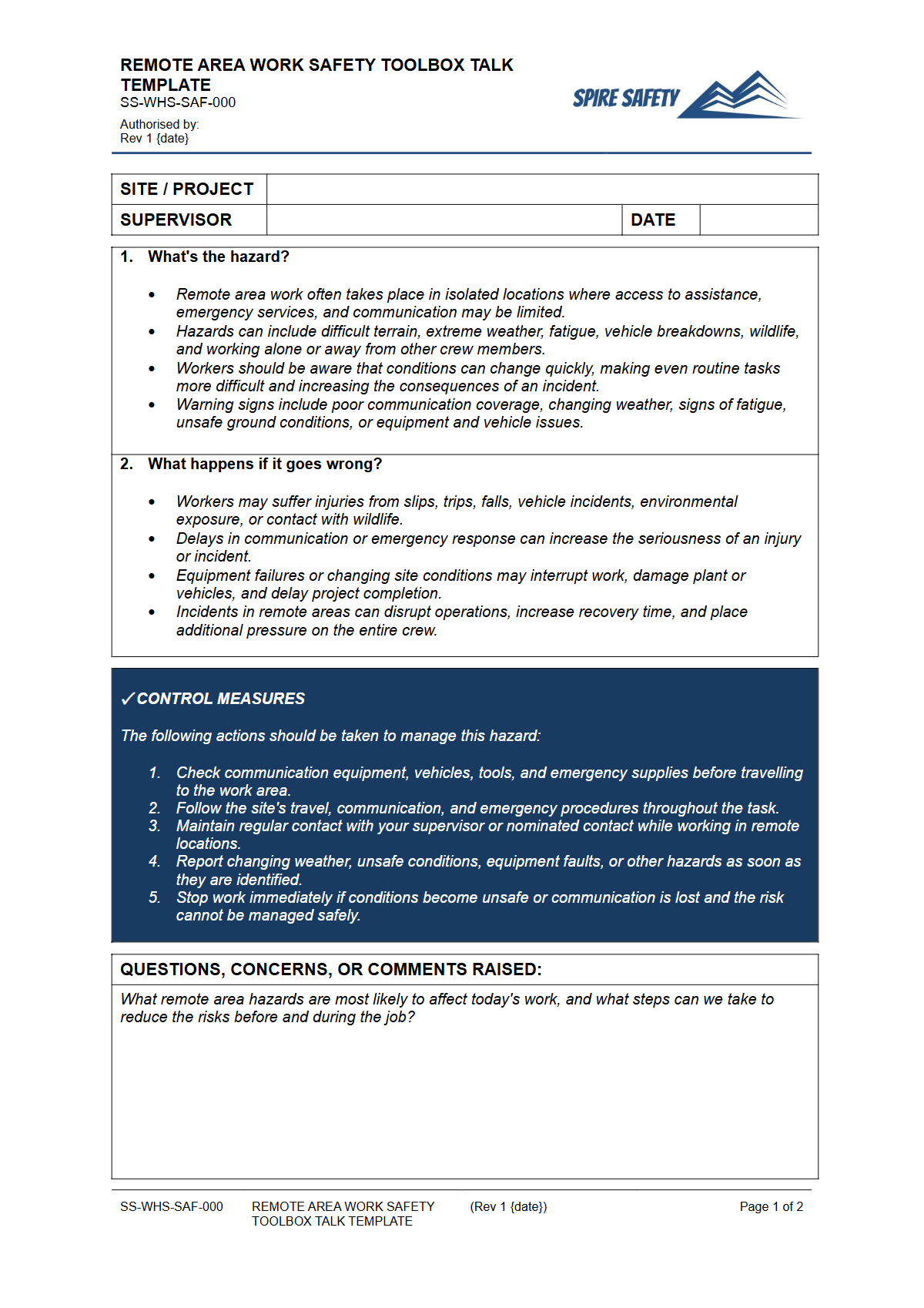
This free Remote Area Work Safety Toolbox Talk Template provides a structured starting point for conducting essential workplace safety discussions. Working in remote locations presents unique challenges, from limited access to emergency services to environmental hazards and isolation.
This template is designed to help organisations facilitate a focused conversation with their workers about these risks and the control measures in place to mitigate them. It aims to foster a proactive safety culture where potential issues are identified and addressed before they lead to incidents.
Using this template, you can ensure that key safety topics related to remote work are consistently communicated, promoting shared understanding and commitment to safe work practices. It assists in fulfilling obligations regarding information, training, and instruction for workers operating in these environments, aligning with Australian WHS practice.
Video walkthrough
How to use this Toolbox Talk
Download the Remote Area Work Safety Toolbox Talk Template in your preferred format (DOCX for editing, PDF for quick reference). The DOCX version is fully editable, allowing you to tailor the content to your specific workplace, remote work activities, and the unique risks associated with your operational areas.
It includes sections for discussion points, identified hazards, existing controls, and opportunities for feedback.
Before conducting the Toolbox Talk, review the template and customise it with relevant examples, site-specific procedures, and any recent incidents or near misses related to remote work. You should add details about communication protocols, emergency response plans, journey management, and welfare arrangements specific to your remote sites.
It is crucial that this template is customised to your workplace's specific risks and operational context to be effective. Merely presenting the generic content may not address the unique safety considerations of your team.
Encourage active participation from all attendees. The most effective Toolbox Talks are interactive, allowing workers to share their experiences and contribute to safety solutions.
Document attendance and key discussion points for your records.
When to use it
This Toolbox Talk on Remote Area Work Safety should be used regularly, especially before workers commence assignments in remote locations, or before undertaking new tasks within a remote area. It is also beneficial:
- As part of your induction process for new workers assigned to remote duties.
- Following any incident or near miss related to remote work.
- When there are changes to remote work procedures, equipment, or environmental conditions.
- During routine safety meetings to reinforce good practices and discuss emerging risks.
- As a refresher to maintain high awareness of remote work hazards.
Regular safety discussions like this are a fundamental component of effective WHS management systems and continuous improvement.
Who should use it
This Remote Area Work Safety Toolbox Talk Template is an invaluable resource for:
- Supervisors and team leaders responsible for overseeing workers in remote areas.
- WHS officers and managers involved in developing and implementing safety procedures for remote operations.
- Project managers coordinating work in remote or isolated environments.
- Anyone facilitating safety meetings or training sessions where remote work is a relevant topic.
- Workers themselves, as a self-guided resource for understanding and preparing for remote work risks, although it is primarily designed for facilitated group discussion.
Organisations committed to maintaining safe work environments, especially those with personnel operating away from established infrastructure, will find this a practical addition to their free WHS resources library.
Common mistakes
Common mistakes to avoid
- Not customising the Toolbox Talk content to specific remote work sites or tasks.
- Failing to encourage worker participation and feedback during the discussion.
- Not documenting attendance and key discussion points for record-keeping.
- Overlooking the psychosocial risks associated with isolation and loneliness in remote work.
Legal references
Legal considerations
The following legal requirements may be relevant to this type of work.
- Work Health and Safety Act (Harmonised) — Provides the primary duties for protecting workers and other people from work health and safety risks.
- Work Health and Safety Regulations (Harmonised) — Sets out requirements supporting the management of workplace hazards and risks.
The following codes may be relevant to this type of work.
- Managing WHS Risks Code of Practice — Provides practical guidance on identifying hazards, assessing risks and applying effective controls.
- Work Health and Safety Consultation, Cooperation and Coordination Code of Practice — Provides practical guidance on consulting workers and coordinating with other duty holders.
- Managing the Work Environment and Facilities Code of Practice — Provides practical guidance on safe work environments, workplace facilities and related controls.
Did you know
Isolation Risks
Prolonged isolation in remote work can contribute to psychosocial hazards, including stress and mental fatigue, underscoring the need for robust communication and welfare checks.
Communication is Key
Reliable communication systems (e.g., satellite phones, two-way radios, personal locator beacons) are critical in remote areas, not just for operational needs but for emergency communication and worker welfare checks.
FAQ
Frequently asked questions
01What constitutes 'remote area work' in a WHS context?
02Why is a specific Toolbox Talk for remote work important?
03How often should remote work safety be discussed?
04Does this template guarantee WHS compliance?
Share this resource
Remote Area Work Safety Toolbox Talk Template
Browse Categories
How To Use It
- 1Download and open in Word or PDF.
- 2Replace the placeholders with your business details.
- 3Get it reviewed by a WHS specialist before rollout.
Need it customised?
Our WHS consultants can adapt this template to your site, run a gap analysis, or audit what you already have in place.
Book a Free Consultation WHS consulting servicesor call 1300 156 382