
Free Pre-Start Checklist (Screen Bucket) Template
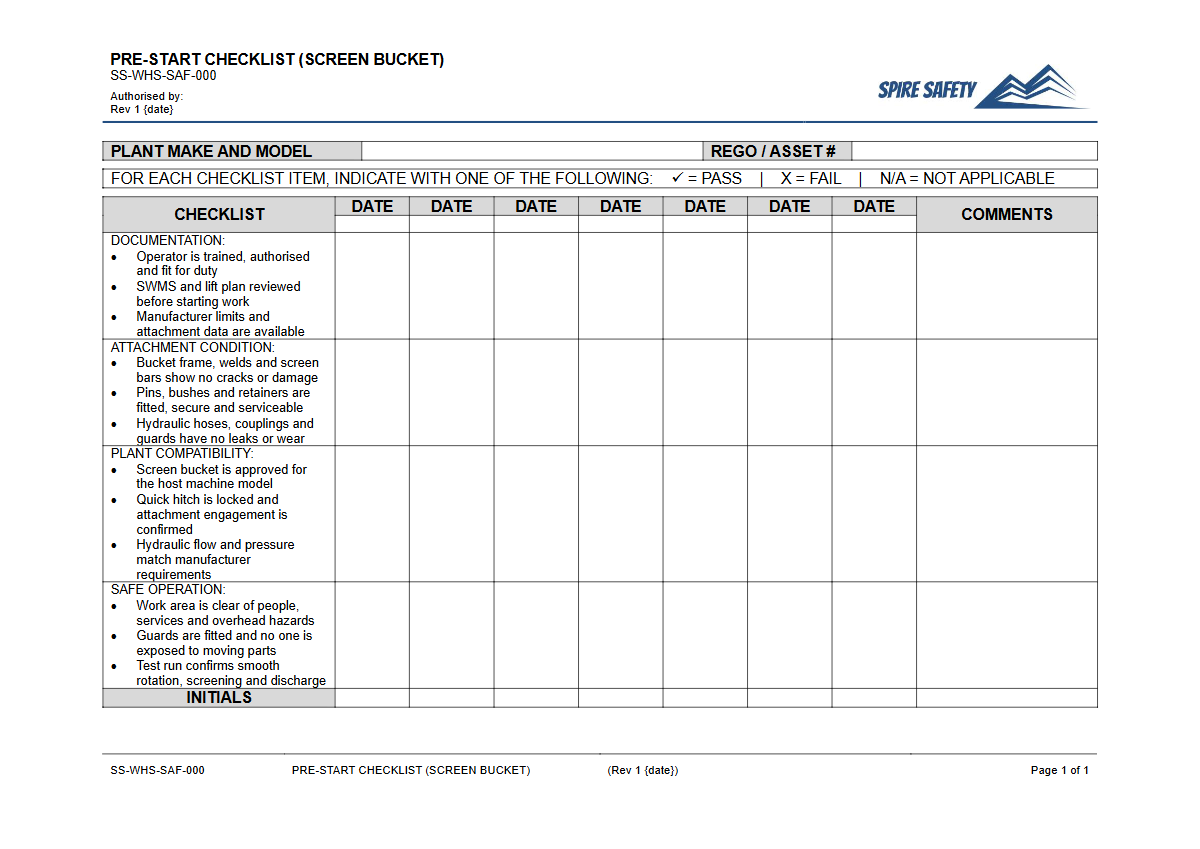
Download our free Pre-Start Checklist (Screen Bucket) Template in DOCX & PDF. A structured starting point for formalising your equipment safety inspections.
Free Pre-Start Checklist (Screen Bucket) Template
DOCX • 125 KB + PDF
Updated Oct 2026
No signup required
Purpose of the Free Pre-Start Checklist (Screen Bucket) Template
Operating heavy machinery attachments like screen buckets requires rigorous safety protocols to prevent incidents. This Free Pre-Start Checklist (Screen Bucket) Template provides a structured starting point for your daily equipment inspections, helping operators systematically identify and report potential hazards before work commences.
Screen buckets, used for sorting materials like soil, rock, and construction debris, feature moving parts, hydraulic systems, and heavy structural components that can fail if not properly maintained. A consistent pre-start inspection process is a critical control measure for managing risks associated with plant operation.
The checklist prompts inspections of key areas such as the hydraulic hoses and connectors, the structural integrity of the bucket and screen mesh, the condition of teeth or cutting edges, and the security of the attachment to the parent machine (e.g., excavator or loader). Formalising this process helps create a safer work environment, reduces the likelihood of costly equipment failure, and supports ongoing maintenance planning.
It also serves as a vital record, demonstrating due diligence in managing workplace health and safety. The consequences of attachment failure can be severe, as highlighted in a tragic incident involving a falling excavator bucket.
Video walkthrough
How to use the Free Pre-Start Checklist (Screen Bucket) Template
This resource is available for immediate download in both DOCX and PDF formats. The DOCX file is fully editable, allowing you to tailor the checklist to the specific makes and models of screen buckets used in your organisation, as well as your unique site conditions and operational risks.
Important: This document is a template, not a finished product. For it to be effective, you must customise it to reflect your specific equipment and workplace hazards.
We strongly recommend consulting with operators, maintenance personnel, and supervisors during the customisation process to ensure the checklist is practical and comprehensive. Once finalised, this document should be integrated into your broader comprehensive WHS management systems, ensuring that all workers are trained on its correct use and the procedures to follow when a fault is identified.
When to use it
The Pre-Start Checklist for a screen bucket should be completed by the operator before the start of each shift or before the equipment is used for the first time on a given day. This routine ensures that the attachment's condition is verified before it is subjected to operational loads.
Completing the check before operation is fundamental to proactive hazard identification. These daily checks can be incorporated into broader safety briefings, which can be documented using a daily pre-start meetings template to ensure all workers are aware of equipment status.
Completed checklists should be retained as part of your safety records. These documents provide valuable data for maintenance scheduling, performance tracking, and can be essential during incident investigations or safety audits.
Who should use it
This checklist is designed for use by trained and competent plant operators who are authorised to use the excavator or loader with the screen bucket attachment. They are the individuals best placed to conduct a thorough physical and visual inspection of the equipment they will be operating.
Supervisors or safety officers may also use the checklist to conduct periodic verifications or audits, ensuring that the pre-start inspection process is being followed correctly and consistently. Verifying that safety processes are correctly implemented is a key component of regular WHS compliance auditing.
Beyond equipment checks, fostering a strong safety culture involves regular communication. Reinforcing key safety messages can be achieved through targeted safety talks, which are useful for discussing topics like pre-start checks and plant maintenance discussions.
For more templates and safety tools to support your WHS framework, browse our complete free WHS resources library.
Common mistakes
Common mistakes to avoid
- Ticking boxes without physically or visually inspecting the corresponding component ('pencil-whipping').
- Failing to customise the generic template to suit the specific make, model, and wear parts of the screen bucket in use.
- Not immediately implementing tag-out/lock-out procedures when a safety-critical defect is found.
- Operators not receiving adequate training on how to properly conduct the checks and what specific faults to look for.
Legal references
Legal considerations
The following legal requirements may be relevant to this type of work.
- Work Health and Safety Act (Harmonised) — Provides the primary duties for protecting workers and other people from work health and safety risks.
- Work Health and Safety Regulations (Harmonised) — Sets out requirements supporting the management of workplace hazards and risks.
The following codes may be relevant to this type of work.
- Managing WHS Risks Code of Practice — Provides practical guidance on identifying hazards, assessing risks and applying effective controls.
- Work Health and Safety Consultation, Cooperation and Coordination Code of Practice — Provides practical guidance on consulting workers and coordinating with other duty holders.
- Managing the Work Environment and Facilities Code of Practice — Provides practical guidance on safe work environments, workplace facilities and related controls.
Did you know
Hydraulic Pressure
The hydraulic systems that power screen buckets can operate at immense pressures, often exceeding 3,000 PSI. A pinhole leak in a hydraulic hose can eject fluid at a velocity high enough to penetrate skin and cause severe injury.
Attachment Incidents
Incidents involving the uncontrolled movement or failure of excavator and loader attachments are a significant cause of serious injuries and fatalities in the construction and resources sectors.
FAQ
Frequently asked questions
01What should happen if a fault is found during a screen bucket pre-start check?
02How often should a screen bucket pre-start checklist be reviewed and updated?
03Can this checklist be used for other types of excavator or loader buckets?
04Is a digital version of a pre-start checklist acceptable in Australia?
Share this resource
Free Pre-Start Checklist (Screen Bucket) Template
Browse Categories
How To Use It
- 1Download and open in Word or PDF.
- 2Replace the placeholders with your business details.
- 3Get it reviewed by a WHS specialist before rollout.
Need it customised?
Our WHS consultants can adapt this template to your site, run a gap analysis, or audit what you already have in place.
Book a Free Consultation WHS consulting servicesor call 1300 156 382