
Free Pre-Start Checklist (CNC Plasma) Template
Download our free Pre-Start Checklist (CNC Plasma) Template in DOCX and PDF. A structured starting point for Australian workshops.
Free Pre-Start Checklist (CNC Plasma) Template
DOCX • 125 KB + PDF
Updated Oct 2026
No signup required
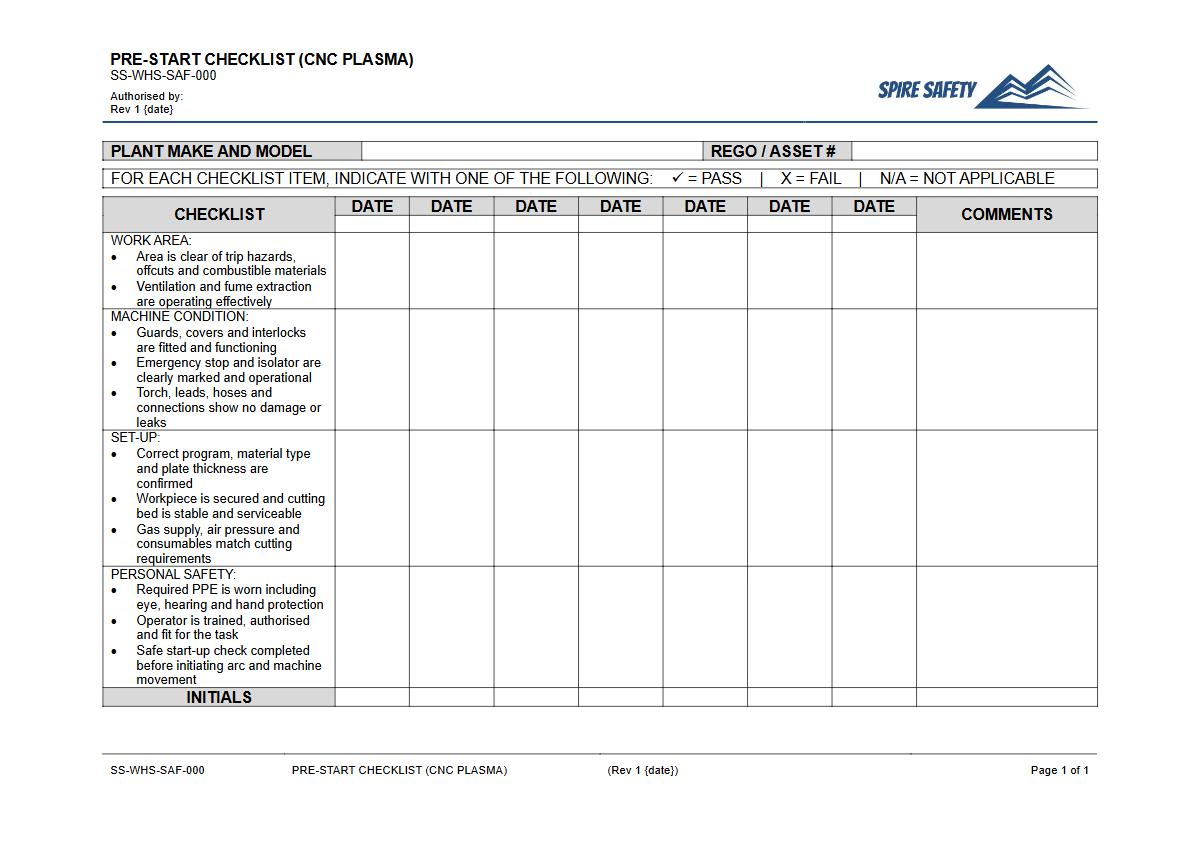
Purpose of the Free Pre-Start Checklist (CNC Plasma) Template
Operating CNC (Computer Numerical Control) plasma cutting machinery involves significant risks, including electrical shock, exposure to hazardous fumes, intense UV radiation, and mechanical hazards. This Free Pre-Start Checklist (CNC Plasma) Template provides a structured framework to guide operators through essential safety and operational checks before using the equipment.
Systematically completing a pre-start inspection helps identify and control potential hazards, reducing the risk of incidents, equipment damage, and costly downtime. It creates a documented record of due diligence, demonstrating a commitment to proactive safety management.
A pre-start checklist is a foundational document that works alongside other key safety procedures. It should be used to support and reinforce the controls outlined in a detailed free Plasma Cutter SOP (Safe Operating Procedure) Template, ensuring operators not only know how to run the machine safely but also verify its condition before they begin work.
Consistent use of this checklist helps embed a positive safety culture where equipment integrity is never assumed.
Video walkthrough
How to use the Free Pre-Start Checklist (CNC Plasma) Template
This template is provided in both DOCX and PDF formats to suit your organisation's needs. The DOCX file is fully editable, allowing for comprehensive customisation.
To use the checklist effectively, first download the document and adapt it to the specific make and model of your CNC plasma cutter, your workplace environment, and any unique operational risks. Integrate it into your daily operational workflow, ensuring all operators are trained on its use and understand the importance of each check item.
Important: This document is a template only. We have no way of knowing your specific workplace hazards, equipment, or operational procedures.
It is your responsibility to customise this checklist to ensure it is fit for purpose and addresses all relevant risks in your work environment. This customised document should then be integrated into your broader WHS management systems to ensure it is managed, reviewed, and updated as required.
When to use the Pre-Start Checklist
The pre-start checklist for a CNC plasma cutter should be completed at the beginning of every shift or before the machine's first use of the day. This routine ensures that the equipment's condition has not changed unexpectedly overnight or between shifts.
It should also be completed after any significant maintenance, repair, or modification to verify that the machine has been returned to a safe operational state. Regular safety discussions, such as a Pre-Start Checks and Plant Maintenance Toolbox Talk, can help reinforce the importance of this daily routine and address any common issues operators may be facing.
Who should use this checklist
This Pre-Start Checklist should be used by several key personnel within an organisation to ensure a comprehensive approach to safety.
- Operators: The primary users are the trained and authorised operators of the CNC plasma cutter. They are responsible for physically performing the checks and signing off that the equipment is safe to use.
- Supervisors: Supervisors and line managers are responsible for ensuring that operators are completing the checklists correctly and consistently. They must also take action when faults are reported, ensuring equipment is properly isolated and repaired.
- Maintenance Personnel: The completed checklists provide valuable data for the maintenance team, helping to identify recurring faults and inform preventative maintenance schedules.
- WHS/Safety Officers: Safety professionals can use the completed records as a lagging indicator of equipment health and a leading indicator of safety process adherence. The data collected is a valuable input for trend analysis and can be reviewed during regular WHS compliance audits.
By defining these roles, you create a closed-loop system where checks are performed, issues are addressed, and the process is continually reviewed for effectiveness. For further guidance on implementing safety documentation, our general WHS consulting services can provide tailored advice for your business, or you can explore other templates in our free WHS resources library.
Common mistakes
Common mistakes to avoid
- Using a generic equipment checklist that misses plasma-specific hazards like gas pressures or torch consumables.
- "Pencil-whipping" the form without physically verifying each check item, defeating its purpose.
- Failing to immediately tag out and report faulty equipment discovered during an inspection.
- Neglecting to customise the template for the specific model and configuration of the CNC machine in use.
Legal references
Legal considerations
The following legal requirements may be relevant to this type of work.
- Work Health and Safety Act (Harmonised) — Provides the primary duties for protecting workers and other people from work health and safety risks.
- Work Health and Safety Regulations (Harmonised) — Sets out requirements supporting the management of workplace hazards and risks.
The following codes may be relevant to this type of work.
- Managing WHS Risks Code of Practice — Provides practical guidance on identifying hazards, assessing risks and applying effective controls.
- Work Health and Safety Consultation, Cooperation and Coordination Code of Practice — Provides practical guidance on consulting workers and coordinating with other duty holders.
- Managing the Work Environment and Facilities Code of Practice — Provides practical guidance on safe work environments, workplace facilities and related controls.
Did you know
Hazardous Fumes
CNC plasma cutting can generate fumes containing metallic oxides and gases like ozone and nitrogen oxides. A pre-start check of the fume extraction system is a critical control to protect operator health.
Arc Eye Danger
The intense ultraviolet (UV) light from a plasma arc can cause a painful condition called photokeratitis, or 'arc eye', from even brief, unprotected exposure. Checking machine guarding and PPE are essential steps to prevent permanent eye damage.
FAQ
Frequently asked questions
01Why is a specific checklist for a CNC plasma cutter necessary?
02How often should a CNC plasma pre-start check be performed?
03What should happen if a fault is found during a pre-start check?
04Is this template enough to be WHS-aligned?
Share this resource
Free Pre-Start Checklist (CNC Plasma) Template
Browse Categories
How To Use It
- 1Download and open in Word or PDF.
- 2Replace the placeholders with your business details.
- 3Get it reviewed by a WHS specialist before rollout.
Need it customised?
Our WHS consultants can adapt this template to your site, run a gap analysis, or audit what you already have in place.
Book a Free Consultation WHS consulting servicesor call 1300 156 382