
Free Pre-Start Checklist (Cold Display) Template
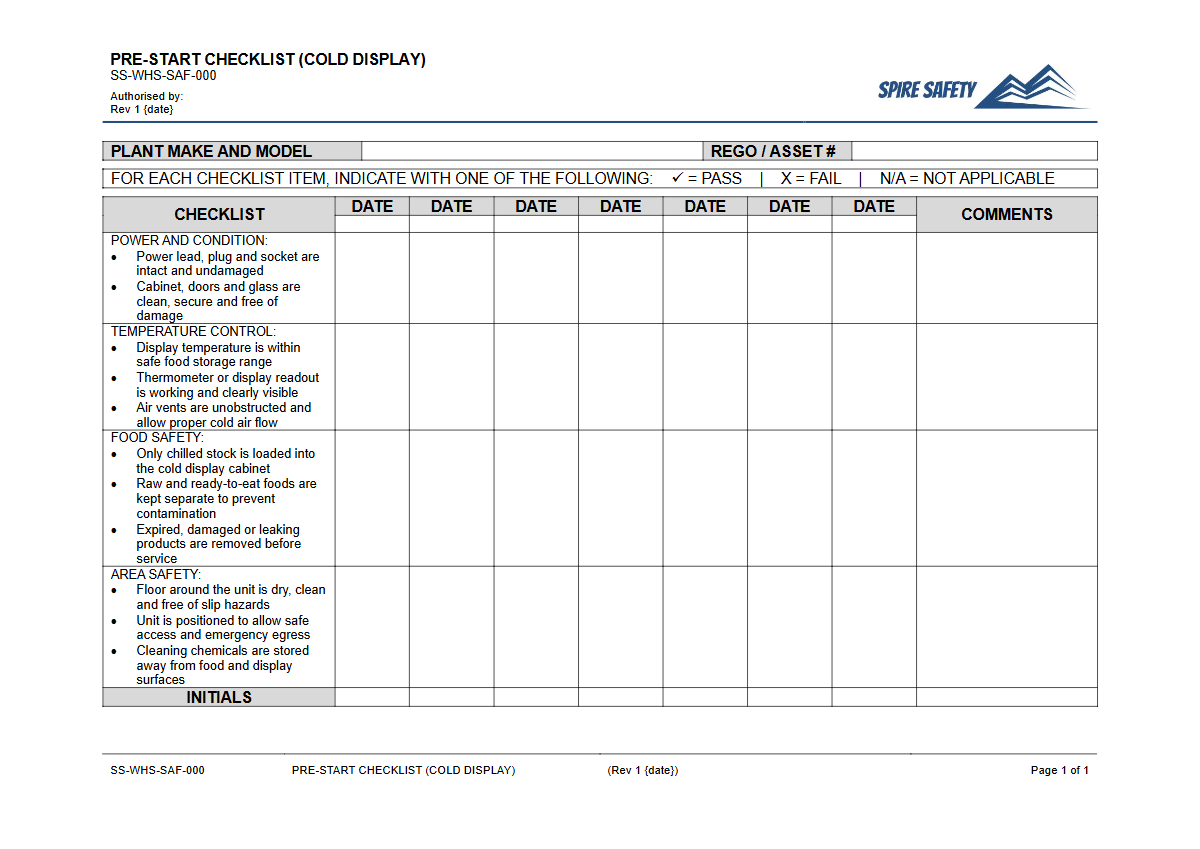
Download our free Pre-Start Checklist for Cold Display units. This template helps formalise daily safety and operational checks.
Free Pre-Start Checklist (Cold Display) Template
DOCX • 125 KB + PDF
Updated Oct 2026
No signup required
Purpose of the Free Pre-Start Checklist (Cold Display) Template
Maintaining the safety and functionality of commercial refrigeration is critical for any business handling food, from cafes and restaurants to supermarkets and catering services. Our free Pre-Start Checklist (Cold Display) Template provides a structured starting point for developing a consistent daily inspection routine.
Using a checklist ensures that key safety and operational items, from temperature settings to electrical safety, are verified before the unit is used for the day. This simple process helps prevent equipment failure, food spoilage, and potential workplace incidents.
The primary goal of this Pre-Start Checklist is to formalise the process of checking equipment. It addresses both Work Health and Safety (WHS) and food safety compliance.
Regular checks help identify potential hazards such as frayed electrical cords, damaged seals, or incorrect temperature holdings before they lead to an incident or compliance breach. A formal checklist also supports broader safety initiatives, such as a company's free Cold Conditions Policy, by ensuring equipment designed for cold environments is functioning correctly and safely.
Video walkthrough
How to use the Free Pre-Start Checklist (Cold Display) Template
This template is provided in both DOCX and PDF formats to suit your operational needs. The DOCX file can be edited to perfectly match your specific equipment and workplace procedures.
- Download: Choose the DOCX version for customisation or the PDF for immediate use.
- Customise: This document is a template and is not a substitute for a site-specific risk assessment. We recommend you customise it by adding, removing, or modifying checks to suit the specific makes and models of cold display units at your workplace, as well as the unique risks present. Consider different checks for open-front displays versus glass-door units.
- Train: Ensure all relevant workers are trained on how to complete the checklist correctly and understand the importance of each check. Explain the procedure for reporting and escalating any faults found.
- Implement: Integrate the checklist into your daily opening procedures. Store completed checklists in a designated location for review by supervisors.
By making this process a standard part of your operations, you create a verifiable record of due diligence. Integrating this checklist into your broader WHS management system ensures it becomes a standard, auditable part of your daily activities.
When to use it
This Pre-Start Checklist should be completed at the beginning of every day or shift before the cold display unit is stocked or used by customers. It serves as a confirmation that the equipment is safe and ready for operation.
It should also be used after any maintenance, deep cleaning, or relocation to ensure all components are functioning as intended. Regular pre-start inspections are a cornerstone of preventative maintenance. You can reinforce their importance with staff using a dedicated Pre-Start Checks and Plant Maintenance toolbox talk.
Who should use it
The responsibility for using this checklist can be assigned to several roles within an organisation:
- Operators/Staff: Retail assistants, kitchen hands, or café staff who are responsible for the daily operation and stocking of the cold display unit are the primary users.
- Supervisors and Managers: Team leaders or managers should review the completed checklists daily to ensure they are being filled out correctly and to action any reported defects or maintenance requests promptly.
- WHS Officers/Coordinators: Safety personnel can use the collected data to identify recurring issues with equipment, analyse trends, and confirm that safety procedures are being followed. Completed checklists serve as valuable records during internal reviews or formal WHS compliance audits, demonstrating proactive safety management.
In a busy hospitality or retail environment, every piece of equipment carries its own set of risks and operational requirements. The structured approach used for this checklist is similar to that of using a Pre-Start Checklist for a coffee grinder, where specific checks are vital for safe and consistent operation.
Adopting this practice across all equipment helps build a strong safety culture. Explore our full free WHS resources library for more templates and guides to support your safety goals.
Common mistakes
Common mistakes to avoid
- Completing the checklist from memory without physically inspecting the unit.
- Failing to escalate identified faults or maintenance issues to a supervisor.
- Using a single generic checklist for different types of cold display units (e.g., open-front vs. closed-door).
- Not retaining completed checklists as a record of safety and maintenance activities.
Legal references
Legal considerations
The following legal requirements may be relevant to this type of work.
- Work Health and Safety Act (Harmonised) — Provides the primary duties for protecting workers and other people from work health and safety risks.
- Work Health and Safety Regulations (Harmonised) — Sets out requirements supporting the management of workplace hazards and risks.
The following codes may be relevant to this type of work.
- Managing WHS Risks Code of Practice — Provides practical guidance on identifying hazards, assessing risks and applying effective controls.
- Work Health and Safety Consultation, Cooperation and Coordination Code of Practice — Provides practical guidance on consulting workers and coordinating with other duty holders.
- Managing the Work Environment and Facilities Code of Practice — Provides practical guidance on safe work environments, workplace facilities and related controls.
Did you know
Food Safety Danger Zone
The food safety 'danger zone' where bacteria multiply fastest is between 5°C and 60°C. Cold displays must consistently hold food at or below 5°C to minimise the risk of foodborne illness.
Refrigeration Energy Use
Commercial refrigeration can account for over 50% of a food retail business's electricity usage. Regular checks on items like door seals and condenser coils can significantly reduce energy consumption and operational costs.
FAQ
Frequently asked questions
01What items should be on a pre-start checklist for a cold display?
02Why are daily checks on refrigerated displays so important?
03Who is responsible for completing the cold display checklist?
04Can this template be used for walk-in cool rooms or freezers?
Share this resource
Free Pre-Start Checklist (Cold Display) Template
Browse Categories
How To Use It
- 1Download and open in Word or PDF.
- 2Replace the placeholders with your business details.
- 3Get it reviewed by a WHS specialist before rollout.
Need it customised?
Our WHS consultants can adapt this template to your site, run a gap analysis, or audit what you already have in place.
Book a Free Consultation WHS consulting servicesor call 1300 156 382