
Free Pre-Start Checklist (CNC Router) Template
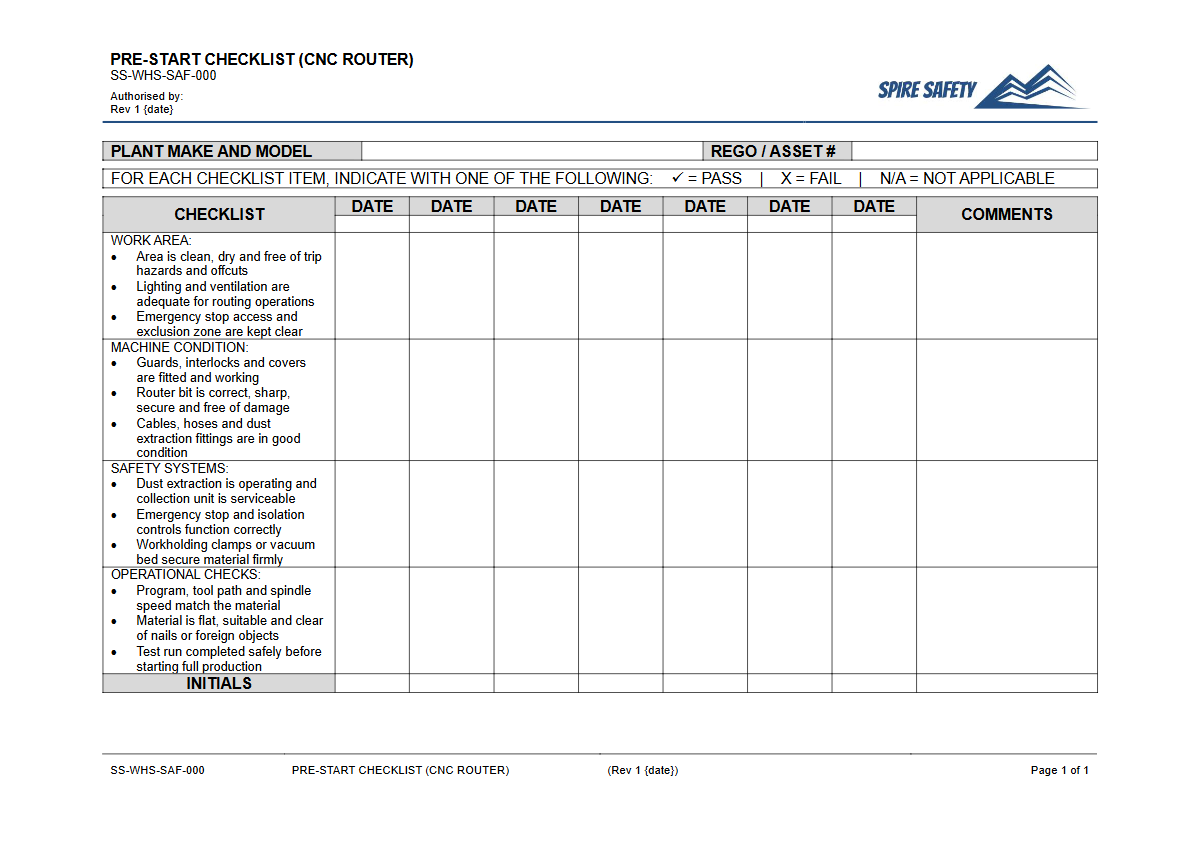
Download our Free Pre-Start Checklist (CNC Router) Template (DOCX & PDF) to formalise your equipment safety inspections. A structured starting point.
Free Pre-Start Checklist (CNC Router) Template
DOCX • 125 KB + PDF
Updated Oct 2026
No signup required
Purpose of the Free Pre-Start Checklist (CNC Router) Template
A Computer Numerical Control (CNC) router is a powerful and precise piece of machinery, but it also presents significant workplace hazards if not properly maintained and operated. Our Free Pre-Start Checklist (CNC Router) Template provides a structured framework for operators to conduct thorough, repeatable safety inspections before using the equipment.
Systematically completing a pre-start check helps identify potential faults, prevent unexpected failures, and reduce the risk of injury from moving parts, ejected materials, or electrical hazards. It serves as a critical tool for documenting due diligence and integrating safety protocols directly into your daily workflow.
Implementing consistent pre-start checks is a fundamental component of proactive safety management. By formalising this process, your organisation demonstrates a commitment to maintaining a safe working environment and managing plant-related risks effectively.
This practice is a cornerstone of robust WHS management systems, helping to ensure that machinery is fit for use before any task commences.
Video walkthrough
How to use the Free Pre-Start Checklist (CNC Router) Template
This template is designed for ease of use and customisation. After downloading the file in your preferred format (DOCX for easy editing or PDF for straightforward printing), you should adapt it to your specific operational context.
The document guides the operator through a logical sequence of checks covering the most common safety-critical components of a CNC router.
Please note: This document is a template and must be customised to suit the specific make, model, and configuration of the CNC router in your workplace, as well as your unique operational risks. We are not responsible for the implementation or compliance of your final document.
Key Inspection Areas Covered
While you must tailor the checklist, it provides a solid foundation by prompting checks on areas including:
- Guards and Interlocks: Ensuring all physical guarding is in place and that safety interlock switches function correctly.
- Emergency Stops: Verifying that all E-stop buttons are accessible, clearly marked, and fully operational.
- Tooling and Collets: Checking that cutting tools are sharp, undamaged, and securely fastened in the collet.
- Workpiece Clamping: Confirming that the material to be cut is rigidly secured to the machine bed.
- Dust Extraction System: Ensuring the extraction system is turned on and operating effectively to control airborne dust.
- General Condition: A visual inspection for leaks, damaged cables, or any other signs of wear and tear.
Regularly reviewing these items helps embed a safety-first mindset. For further reinforcement, you can incorporate these points into your regular safety meetings using our Pre-Start Checks and Plant Maintenance Toolbox Talk Template.
When to use it
A CNC router pre-start checklist should be completed at the beginning of every shift or before the first use of the day. It should also be performed whenever a new operator takes over the machine or after any maintenance, adjustment, or repair work has been carried out.
This frequency ensures that the equipment's condition is verified before it is put into operation, catching potential issues before they can lead to an incident. Regular completion of these records is often a key point of verification during a WHS compliance auditing process.
Who should use it
This checklist is intended for use by trained and competent personnel who are authorised to operate the CNC router. Operators have the most hands-on interaction with the equipment and are best placed to recognise changes in its condition or performance.
Supervisors should also use the completed checklists to monitor compliance and identify recurring maintenance issues. It is the responsibility of the Person Conducting a Business or Undertaking (PCBU) to ensure that all operators receive adequate information, training, and instruction on how to perform these checks correctly.
If you need assistance developing training programs or competency frameworks, consider seeking expert WHS consulting services.
By ensuring every operator uses the checklist, you standardise safety procedures across all shifts and teams. This same principle of standardised checks can be applied to other workshop equipment, such as that detailed in our Free Pre-Start Checklist (Air Arc) Template. For more ready-to-use templates and tools, explore our complete free WHS resources library.
Common mistakes
Common mistakes to avoid
- Failing to check that the dust extraction system is active and effective.
- Skipping a physical test of the emergency stop buttons, assuming they work.
- Neglecting to confirm the workpiece is securely clamped, leading to movement during operation.
- Using dull or damaged tooling, which can shatter or cause a poor finish and machine strain.
Legal references
Legal considerations
The following legal requirements may be relevant to this type of work.
- Work Health and Safety Act (Harmonised) — Provides the primary duties for protecting workers and other people from work health and safety risks.
- Work Health and Safety Regulations (Harmonised) — Sets out requirements supporting the management of workplace hazards and risks.
The following codes may be relevant to this type of work.
- Managing WHS Risks Code of Practice — Provides practical guidance on identifying hazards, assessing risks and applying effective controls.
- Work Health and Safety Consultation, Cooperation and Coordination Code of Practice — Provides practical guidance on consulting workers and coordinating with other duty holders.
- Managing the Work Environment and Facilities Code of Practice — Provides practical guidance on safe work environments, workplace facilities and related controls.
Did you know
Automated but Not Risk-Free
Despite their automated operation, CNC machines are a leading source of machinery-related injuries in workshops, often due to improper setup, programming errors, or bypassing safety guards during operation.
The Importance of Lockout/Tagout
Many CNC router incidents occur during maintenance. A formal Lockout/Tagout (LOTO) procedure, used in conjunction with a pre-start check upon completion, is essential to prevent accidental start-up.
FAQ
Frequently asked questions
01What are the most critical safety checks for a CNC router before operation?
02How often should a CNC router pre-start check be performed?
03Who is responsible for completing the CNC router pre-start checklist?
04Can a digital pre-start checklist be used for a CNC router?
Share this resource
Free Pre-Start Checklist (CNC Router) Template
Browse Categories
How To Use It
- 1Download and open in Word or PDF.
- 2Replace the placeholders with your business details.
- 3Get it reviewed by a WHS specialist before rollout.
Need it customised?
Our WHS consultants can adapt this template to your site, run a gap analysis, or audit what you already have in place.
Book a Free Consultation WHS consulting servicesor call 1300 156 382