
Free WHS Inspection (Server Room) Template
Download our Free WHS Inspection (Server Room) Template to manage electrical, fire, and trip hazards.
Free WHS Inspection (Server Room) Template
DOCX • 127 KB + PDF
Updated Oct 2026
No signup required
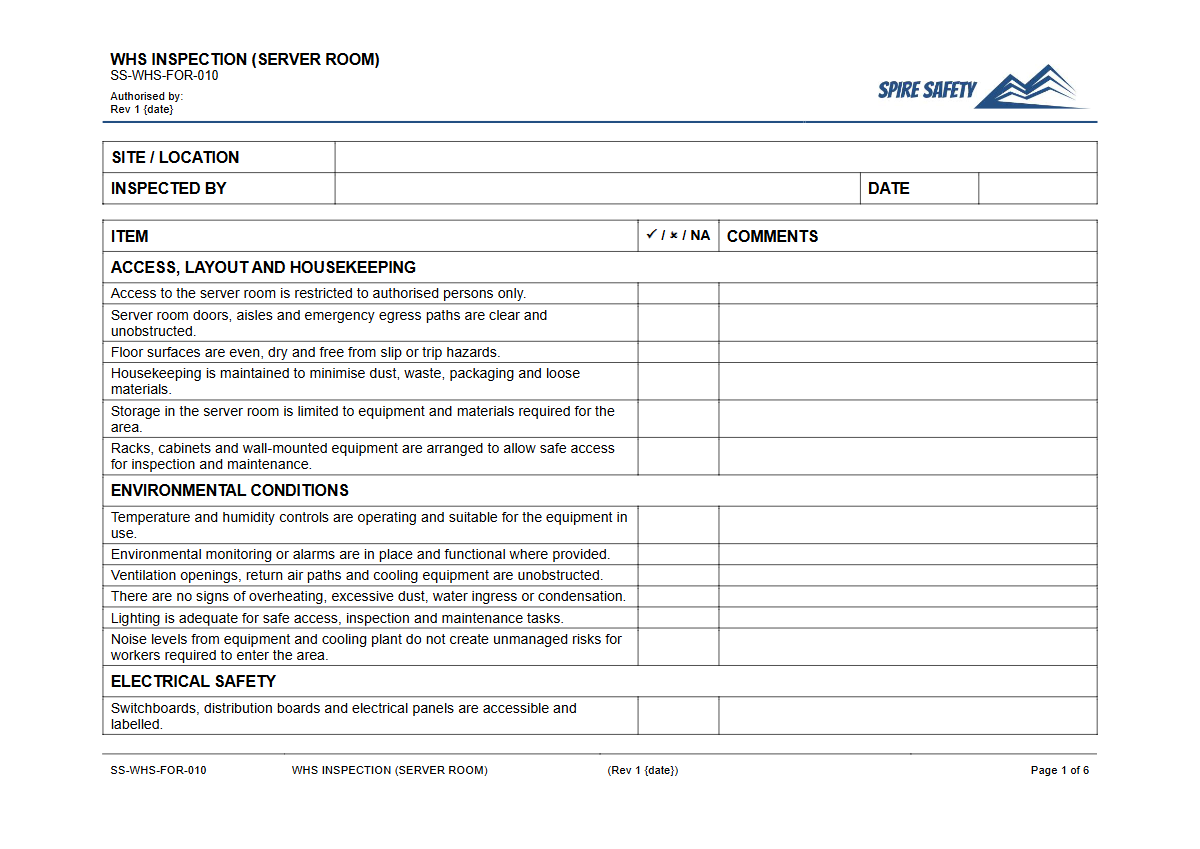
Purpose of the Free WHS Inspection (Server Room) Template
Server rooms and data centres contain unique and concentrated WHS hazards, from high-density electrical systems to critical cooling infrastructure. This Free WHS Inspection (Server Room) Template provides a structured starting point for organisations to formalise their safety checks, identify risks, and implement controls.
Its purpose is to guide a systematic examination of the environment to manage hazards like electrical faults, fire risks, overheating, trip hazards from cabling, and unauthorised access.
Using this template helps demonstrate proactive safety management and due diligence. A completed inspection record is a valuable document that can be used to track corrective actions, report to management, and provide evidence of your safety processes during a formal WHS compliance audit.
Video walkthrough
How to use the Free WHS Inspection (Server Room) Template
The template is provided in both DOCX and PDF formats for your convenience. To use it effectively, download the DOCX file and adapt it to your specific operational needs.
This involves adding or removing checklist items based on the equipment, layout, and specific risks present in your server room. For example, your checks must account for the specific type of fire suppression system and backup power supply (UPS) you have installed.
Important: This document is a template, not a finished safety document. We cannot know the specific hazards of your workplace.
You must customise this template to reflect the actual equipment, processes, and risks in your server room. Once customised, ensure that personnel conducting the inspection are competent and trained on what to look for.
All completed inspections should be filed and any identified issues assigned for corrective action.
When to Conduct a Server Room Inspection
Regular, scheduled inspections are key to maintaining a safe server room environment. The frequency depends on the criticality of the facility, the age of the equipment, and your organisation's risk profile.
A common schedule is monthly or quarterly.
In addition to routine checks, an inspection should also be conducted:
- After a new server rack or major piece of equipment has been installed.
- Following an incident, such as a power outage, water leak, or fire alarm.
- After significant maintenance has been performed on electrical or cooling systems.
- If there are any changes to the physical layout or access controls of the room.
Who Should Use This Inspection Template
This template is designed for use by any personnel responsible for the safety and operation of IT infrastructure. This typically includes:
- IT Managers and System Administrators
- Facilities Managers
- Work Health and Safety (WHS) Officers and Representatives
- Data Centre Technicians
- Internal or external auditors
For complex environments or where in-house expertise is limited, seeking advice from a WHS consulting professional is recommended to ensure your inspection process covers all specific risks.
Key Hazards to Check in a Server Room
Your customised inspection should focus on several key areas:
- Electrical Hazards: Check for overloaded power boards, exposed wiring, correct labelling of circuits, and the condition of UPS units. Ensure all equipment is tested and tagged in line with your state's regulations.
- Fire Hazards: Verify that fire suppression systems are serviced and unobstructed. Check for clear access to fire extinguishers and ensure no combustible materials (like cardboard boxes) are stored in the room.
- Environmental Controls: Monitor temperature and humidity levels to ensure they are within safe operating ranges for the equipment. Check that air conditioning units and vents are clean and unobstructed, a principle also found in our free Pre-Start Checklist for Cool Rooms.
- Physical and Security Hazards: Look for trip hazards from cables or floor tiles. Ensure racks are stable and secured. Verify that access controls are working correctly and that only authorised personnel can enter, a process similar in principle to checks on our free Boom Gate Pre-Start Checklist.
A robust inspection process is a cornerstone of a safe workplace and an effective WHS management system. Explore our full free WHS resources library for more templates and guides to support your safety goals.
Common mistakes
Common mistakes to avoid
- Ignoring minor trip hazards from loose cables or raised floor tiles.
- Blocking fire suppression systems or emergency exits with equipment or storage.
- Failing to regularly test backup power supplies (UPS) and review their battery life.
- Allowing unauthorised or untrained personnel to access the room.
Legal references
Legal considerations
The following legal requirements may be relevant to this type of work.
- Work Health and Safety Act (Harmonised) — Provides the primary duties for protecting workers and other people from work health and safety risks.
- Work Health and Safety Regulations (Harmonised) — Sets out requirements supporting the management of workplace hazards and risks.
The following codes may be relevant to this type of work.
- Managing WHS Risks Code of Practice — Provides practical guidance on identifying hazards, assessing risks and applying effective controls.
- Work Health and Safety Consultation, Cooperation and Coordination Code of Practice — Provides practical guidance on consulting workers and coordinating with other duty holders.
- Managing the Work Environment and Facilities Code of Practice — Provides practical guidance on safe work environments, workplace facilities and related controls.
Did you know
Cooling is Key
A server room's cooling system can consume as much, or even more, power than the IT equipment it supports. A 1°C increase in ambient temperature can significantly raise cooling costs and equipment failure rates.
Cable Management Matters
Poorly managed cables not only create significant trip hazards but can also obstruct airflow, leading to equipment overheating and increasing fire risk.
FAQ
Frequently asked questions
01What are the biggest WHS risks in a server room?
02How often should we inspect our server room?
03Is this template suitable for a small business server closet?
04Can I add our company logo to this template?
Share this resource
Free WHS Inspection (Server Room) Template
Browse Categories
How To Use It
- 1Download and open in Word or PDF.
- 2Replace the placeholders with your business details.
- 3Get it reviewed by a WHS specialist before rollout.
Need it customised?
Our WHS consultants can adapt this template to your site, run a gap analysis, or audit what you already have in place.
Book a Free Consultation WHS consulting servicesor call 1300 156 382